3. Führe deine erste Posting-Aufgabe durch
Ziel: Führe eine Aufgabe mit einem Telefon, einem Konto und einem Video durch, und überprüfe dann das Ergebnis auf dem Telefon.
Die TikMatrix-Route speichert einen TikTok-Entwurf. Die IgMatrix-Route veröffentlicht tatsächlich einen Instagram Reel. Wähle ein Video, das für das gewünschte Ergebnis geeignet ist.
1. Bereite ein Video vor
- Erstelle einen neuen Ordner auf deinem Computer, z.B.
first-post. - Lege ein abzuspielendes MP4-Video darin ab und merke dir den Ordnerort.
- Bestätige, dass die Ziel-Anwendung funktioniert und mit dem richtigen Konto angemeldet ist. Das Gerät sollte Bereit sein, ohne dass eine andere Aufgabe sie nutzt.
Erfolgscheck: Der Ordner enthält nur diese Videodatei, und das Telefon hat das richtige Konto.
2. Öffne die Posting-Aufgabe
Wähle nur ein Telefon in Geräte aus, dann öffne Skripte → Beitrag in der unteren Symbolleiste. Überprüfe die Plattform und das App-Paket.
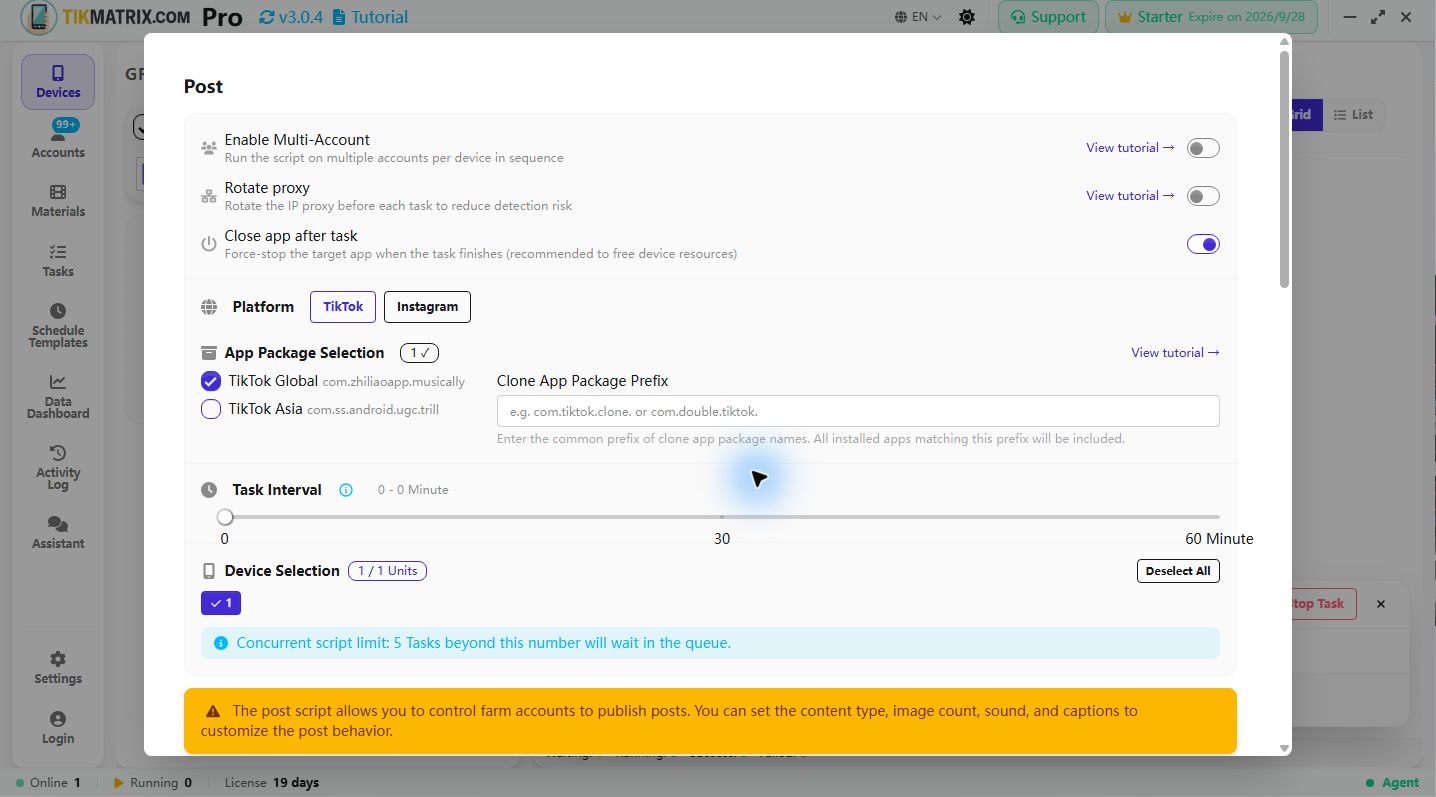
Verwende diese Einstellungen. Die Anwendung könnte vorherige Werte speichern, daher überprüfe jede Einstellung.
| Einstellung | Erster Lauf Wert |
|---|---|
| Ausgewählte Geräte | Nur 1 Telefon |
| Multi-Account aktivieren | Aus; verwendet das aktuelle Telefonkonto |
| Proxy drehen | Aus; verwendet die Verbindung, auf der die Anwendung bereits funktioniert |
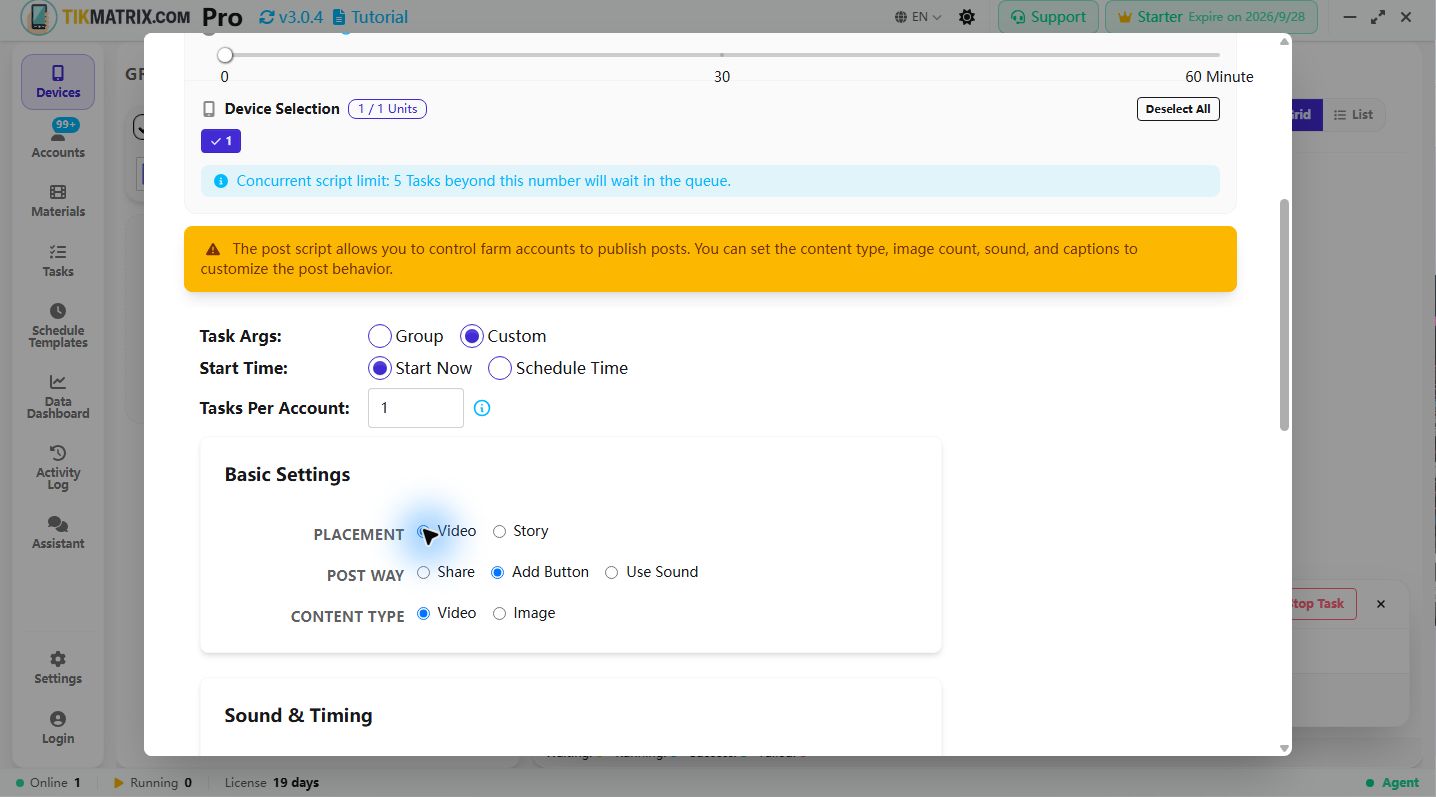
| Aufgabenparameter | Benutzerdefiniert |
| Startzeit | Sofort starten |
| Aufgaben pro Konto | 1 |
| Posting-Methode | Schaltfläche hinzufügen |
| Inhaltstyp | Video |
| Materialsquelle | Lokaler Ordner |
| Materialpfad | Der von dir erstellte Ordner, nicht die einzelne Videodatei |
| Bildunterschrift-Format | Mehrzeilig |
| Bildunterschrift | Eine Zeile, z.B. "Ein Moment von heute" |
TikMatrix: Speichere einen TikTok-Entwurf
- Platzierung: Video, nicht Story.
- Sound hinzufügen: Deaktiviert.
- Entwurf speichern: Ein. Dies wird nur für reguläre TikTok-Videos unterstützt.
- Material als verwendet kennzeichnen: Aus für diese Entwurfsübung, damit das Video für den späteren Publishing-Schritt verfügbar bleibt. Überprüfe diese Einstellung erneut vor dem normalen Posten.
- Starten Sie mit einer Upload-Wartezeit von 30–60 Sekunden.
Vor dem Start: Überprüfe, dass "Entwurf speichern" aktiviert ist. Andernfalls könnte die Aufgabe das Video veröffentlichen.
IgMatrix: Veröffentliche einen Instagram Reel
- Platzierung: Reel.
- Deaktiviere die geplante Veröffentlichung für diesen sofortigen Beitrag.
- Starten Sie mit einer Upload-Wartezeit von 30–60 Sekunden.
Vor dem Start: Diese Route veröffentlicht gemäß den aktuellen Zielgruppeneinstellungen des Kontos. Es ist keine Entwurfsübung. Bestätige, dass Konto, Video und Bildunterschrift zum Veröffentlichen bereit sind.
3. Ausführen und überprüfen
- Überprüfe erneut, dass die Geräteanzahl 1 und die Aufgaben pro Konto 1 sind, zusammen mit den Einstellungen für deine Plattform.
- Klicke einmal auf Skript starten.
- Öffne Aufgaben, um den Fortschritt zu verfolgen. Lass das Telefon verbunden und vermeidest die manuelle Bedienung der Ziel-Anwendung, während es läuft.
- Nachdem die Aufgabe endet, überprüfe das tatsächliche Ergebnis auf dem Telefon:
- TikTok: Öffne Entwürfe aus dem Profil und bestätige das Video. Der Entwurf bleibt auf diesem Telefon und wurde nicht veröffentlicht.
- Instagram: Öffne das Video aus der Sektion Reels des Profils und überprüfe Inhalt und Bildunterschrift.
Fertig bedeutet, dass das Aufgabenergebnis dem Inhalt auf dem Telefon entspricht. Das reine Erstellen einer Aufgabe ist kein Abschluss.
Hier stecken bleiben?
| Was du siehst | Versuche das zuerst |
|---|---|
| Kein verfügbares Material | Überprüfe, dass Lokaler Ordner ausgewählt ist, der Ordnerpfad korrekt ist und ein abzuspielendes Video enthält. |
| Aufgabe bleibt warten | Überprüfe, dass Sofort starten aktiv ist, das Gerät nicht mit anderen Aufgaben beschäftigt ist und der Lizenzzustand stimmt. |
| Anwendung stoppt bei Popup oder Verifizierung | Lese das Aufgabenprotokoll und überprüfe das Telefon; führe erforderliche manuelle Schritte aus, bevor du entscheidest zu wiederholen. |
| Upload-Timeout | Überprüfe zuerst, ob auf dem Telefon bereits ein Entwurf oder Beitrag vorhanden ist. Wenn nicht, überprüfe das Netzwerk und erhöhe die Upload-Wartezeit. |
| Aufgabe fehlgeschlagen, aber Inhalt vorhanden | Bestätige vorhandene Inhalte, bevor du sie erneut versuchst, um Duplikatposting zu vermeiden. |
Wenn du Unterstützung benötigst, gib die App-Version, das Telefonmodell, den fehlgeschlagenen Schritt, den Aufgabenfehler und den Bildschirm an, auf dem das Telefon stoppte. Verberge Passwörter und Verifizierungscodes vor dem Absenden.
Nach dem Erfolg schrittweise erweitern
- Um auf TikTok zu veröffentlichen, überprüfe den Inhalt und schalte Entwurf speichern aus. Nutze weiterhin ein Telefon zum Testen.
- Für Materialverwaltung, Musik und Planung siehe Posting-Referenz.
- Um Telefone hinzuzufügen, siehe Gerätegruppen.
- Um Konten auf einem Telefon zu wechseln, siehe Multi-Account-Wechsel.
Füge jeweils eine Einstellung hinzu, damit du leichter ein Problem identifizieren kannst.